Table of Contents
1 0.9.8
1.1 What's New
- Added support for RTS or DTR PTT control on same serial port as CAT control. This capability is important for radios that do not provide CAT PTT control, and is also preferrable to CAT PTT control when possible as it exhibits lower latency and higher reliability. For example, the IC7300 can be configured to use "USB Keying => RTS" and ION2G can use the RTS line to control transmission. This capability has been tested with Digirig as well. The previous option of a separate serial port for PTT has been removed due to lack of use and utility.
- New option in Settings->Audio Settings under Alert options, to set missed call alert timeout time. Previous behavior was unlimited, new behavior allows selecting a duration from [1 min, 5 min, 10, 10 min, 60 min, 2 hrs, 4 hrs, 8 hrs, or 1 day]. The default is now 5 min. The new option is to aid users with stations that often run as unattented messaging stations.
- PTT status polling is now enabled for IC7300, F8101, and FLRig radio interfaces. This feature will ensure that the link does not timeout so long as the PTT of the radio is activated periodically. Currently the most useful cases are voice traffic where you do not want a link timeout while using the radio microphone, and data via FLRig, where another modem moves traffic as followon to the linkup with an undetermined duration.
1.2 Bug fixes
- Fixed an issue that caused "Always Use Voice Mode" to not work with some radios.
- Re-enabled FT991A driver support for Voice or Data Mode (e.g. USB Vs. USB-D) control. This driver should now respect the global VOICE / DATA mode setting in Settings->Radio Controls. See details / explanation for this setting below from release 0.9.7.9.
- Fixed an issue that caused the quick call dialog to not respect the manually chosen channel when starting a call.
2 0.9.7.9
2.1 What's New
- Added version string to title bar for easier reference
- Auto scan: New setting under Settings->Other. If Auto Scan Time is non-zero, ION2G will automatically start scanning after the configured delay time following start up. The delay time is extended if the user operates the radio by changing channels, frequency modes, etc. This feature is intended for stations that need high availability, and would for example, ensure the station went to scan mode after program restart, reboot, etc.
- debug.log files now rotate out for a total of five small 10k files named debug.log (most recent) and debug.log.0..3 for the last four prior. This is to control unbounded log file growth.
- Added network name to sounding dialog for better awareness
- New "FlRig" radio driver. This new driver allows using FlRig to control the radio, expanding ION2G's radio support to include all radios supported by FlRig. Tested to support up to 10 channels/second scan rate. Note: for best performance, disable most or all polling in FlRig. –> To use, select FLRig as the radio type, then leave IP address as 127.0.0.1, but enter the correct port number for FLRig. You can find the port number FLRig is using by checking the "Server" setting under Configure options in FLRig.
- The non-functional BANDS button has been replaced with a CW ID button on the radio controls view. This new CW ID button will send the primary address of the current network in CW on the current channel.
- Tune Tone amplitude is now configurable in Settings->Other->Tune Tone Amplitude (%)
- In Radio Settings, a new option to control use of VOICE or DATA mode.
- Select 'Always use DATA mode' if your radio must be set to DATA mode (USB-D, LSB-D, etc.) in order to select the correct interface port for audio from the computer and or to select the correct channel filter, AND can remain in this mode at all times (even when you use the microphone for voice).
- Use 'Always use VOICE mode' if your radio must be set to VOICE mode (USB, LSB, etc.) in order to select the correct interface port for audio from the computer and or to select the correct channel filter, AND can remain in this mode to enable use of the microphone.
- Use 'Voice mode after linkup' if your radio requires DATA mode (USB-D, LSB-D, etc) to select the correct interface port for audio from the computer and or to select the correct channel filters, BUT must be switched to VOICE mode (USB, LSB, etc.) after linkup to enable the use of the microphone.
- Improved UI elements on Radio Controls view
- New UI option to have button bar on the left (Settings->Other->UI Options). Can also be set to original bottom position.
- New control buttons in Radio Controls view
- computer or radio audio IO selection
- new volume slider vs. old push buttons
- volume mute control (press and hold to fully disable the mute)
- PTT button on Radio Controls view (active when using computer audio)
- Quick Channel access button
- click to access heirarchical network and channel selection to
quick tune to a given channel rather than having to step through
channels
- note, only enabled when not scanning
- New propagation check button: open propagation history for specified station
- New quick call button
- Larger call and hangup/scan control buttons for easier use on touch screens
- Improved consistency across dialogs within application
- Removed some superfluous animations for a snappier interface
The software now warns if you configure networks with ambiguous channel assignments (this is to deal with cases where the ALE controller cannot distinguish between incoming call networks if self address isn't unique and channel frequency isn't unique). You will be warned only when saving a network change that may create a conflict, and when enabling a network to be scanned which also shares channels with another network that will be scanned.
Background: In an inbound call is destined for a self address that is not unique to a single network, such as ALLCALL, ANYCALL, wildcard, or a self address that is assigned to multiple networks, AND the channel frequency belongs to more than one network, the ALE controller will associate the call with the first network configuration it finds that matches. This could be a problem if for example the network parameters did not agree (TX enabled, vs not enabled, timing parameters (response timeouts, time slots, etc.). Also the network call information logged to the database could be wrong, which could create confusion.
2.2 Bug fixes
- fixed and issue that could cause windows to open off-screen if started after a resolution change or a monitor was removed or changed
- fixed an issue that could cause a crash on windows if the program was started with the previously configured audio device missing
- fixed issue that prevented sounding cycle from aborting correctly when top scan/stop button or radio control view stop button is pressed
- fixed issue that preventing transmission from aborting during listen-before-transmit
- fixed issue that incorrectly allowed entering scan during start of call
- FT991A driver no longer sets the radio in DATA mode, and now only uses USB, LSB, etc. This is to fix an issue where the radio applies a band pass filter that is too narrow when used in DATA mode
- FTDX10 driver no longer sets the radio in DATA mode, and now only uses USB, LSB, etc. This is to fix an issue where the radio applies a band pass filter that is too narrow when used in DATA mode
- Fixed issue that prevented Icom CIV address from being saved in settings
- Fixed missing scroll bar on Edit Contact view
- Fixed issue that prevented selcall (ccir-493-4) calls from the keypad view
- Fixed issue that prevented saving selcall addresses to the directory
- Fixed issue that allowed invalid alphanumeric address to be saved for a selcall network contact (which must be numeric only).
- Fixed issue that caused ALLCALL alert window to stay open after link clears
- Fixed issue that caused incorrect export of codeplug directory when a contact was associated with more than one self address on a network
3 0.9.7.8
3.1 What's New
Automatic poll-for-best channel and link
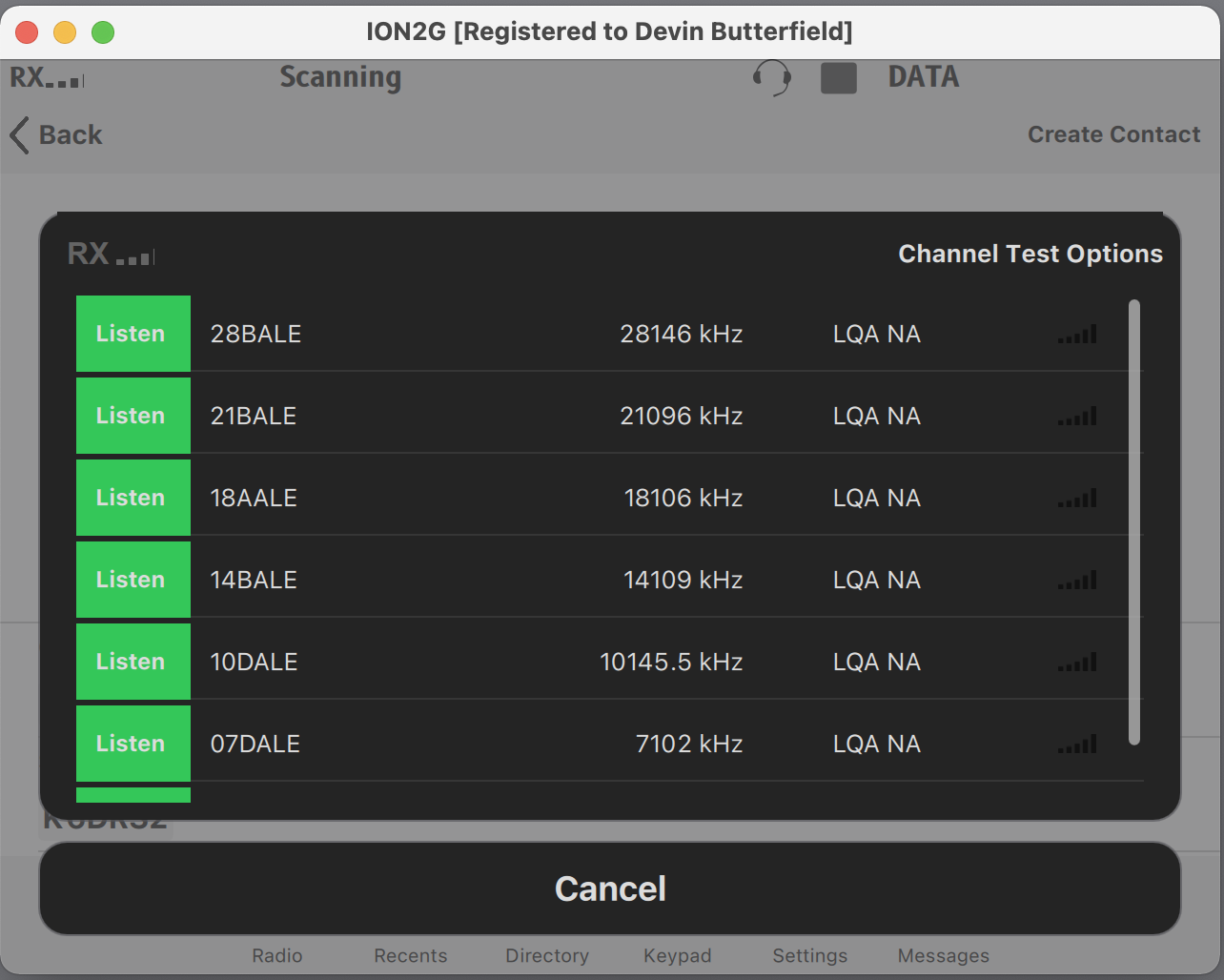
Now when a call is placed, the operator is presented with an additional option called "Poll For Best" which performs an LQA polling call of all channels in the selected network and collects LQA data for each (BER, SINAD), then after the poll completes the controller will launch the final linkup on the best channel found.
- New Propagation view has been added to the call channel select view. This aids the operator by visually representing currently known / historical channel quality for the station about to be called – allowing the operator to better choose which type of call to make (auto, poll for best, manual, etc.).
Single channel LQA polling update
Each time you open the Manual Channel Select dialog the LQA data for the channels in the network is historical (based on a weighted average over a period of days). This update improves the LQA data relevancy by showing the latest LQA result for a channel after the test completes rather than averaged with historical data. The display now clarifies which data results are historical and which are current. As shown here, each channel you test will be updated with current LQA data. Note that every time you re-open the dialog, historical data is shown until you execute a channel test for a particular channel.

- New experimental driver for the FT-891 (NOT TESTED)
- Directory view is now automatically sorted by name alphanumerically
- windows now remember their positions and dimensions on restart
- Changed LQA weighting to be non linear and heavily weight very recent data (now using 1/d2) where d==days).
- New ts590 driver ready for testing
- Added new Tune Gap (msecs) in Settings->Other which can be set to generate a gap after the tune tone which aids some tuners
3.2 Bug Fixes
- Sending AMDs while linked should not break the link if they fail
- Fix issue where if there are multiple networks configured with the same channel, and a call comes in the LC may decide the call network is the first it finds. Later when self address matching is performed the "call network" doesn't have the self address.
Updated code to resolve channel and called address to self address and matching network configuration among the list of networks. So it will now look through the entire channel list rather than first in the list as before.
NOTES: If you have multiple networks configured which have one or more channels in common, the software can only determine the network an inbound call is for by matching the self address to the network. If the same self address (secondary for example) is used in two networks that also share a common channel, the software has no way to determine which network an inbound call on the common channel to the common self address is for – so it will simply pick the first match it finds. Generally this will not have any negative affects, so long as there are no configuration errors (like one of the networks sharing common channel and self address is disabled for transmit – this will likely cause linking failures, and is a configuration error).
Another configuration issue is where you have more than one network with a common channel, and one of them disagrees on something like transmit enable. This is another ambiguous configuration that the software cannot reconcile.
It is important to also note that multiple networks sharing a common channel cannot be resolved when receiving an ALLCALL or ANYCALL on the common channel. The software will simply choose the first matching network it finds.
- Fix FT897 driver to support full freq range
- Switch to MHz display when frequency is above HF band
- Small graphical fixes for dark mode
- Fixed issue with inconsistent use of tune preamble
- Fixed issue with network creation that caused that network to not be enabled for scan if it was initially disabled in the configuration
- Fixed and issue with multi-network scanning that caused common channels to not be scanned if one of the networks was not enabled for scan.
- Highlight on chan select drawer should remember last clicked item and select it next time
- Temporarilly disabled caps exchange and traffic channel qsy further study is needed to develop these capabilities
- Remain in link if amd or other handshake AFTER linkup fails. Previous behavior was to abort.
4 0.9.7.7
4.1 What's New
- New support for the Yaesu FT991A
- New support for the Icom IC-7610
- New support for the Yaesu FT-100D
- New support for the Yaesu FTDX-10
- New support for the Kenwood TK-90
- New quick dialog for selecting which network to scan
- Added new channel settings list columns: [scan enable, tx enable, traffic]
- Added label to keypad view call type dropdown to clarify it's function
- Improved scrollbar widths
- New search capability on channel list view
Single channel LQA polling
When you want to place a call to a station that you don't have link quality data for (because they are not sounding), you can use Manual Channel Select calling mode and test each channel for a good path before placing a call.
Start by clicking the station address you want to call.

Then click Manual Channel Select.

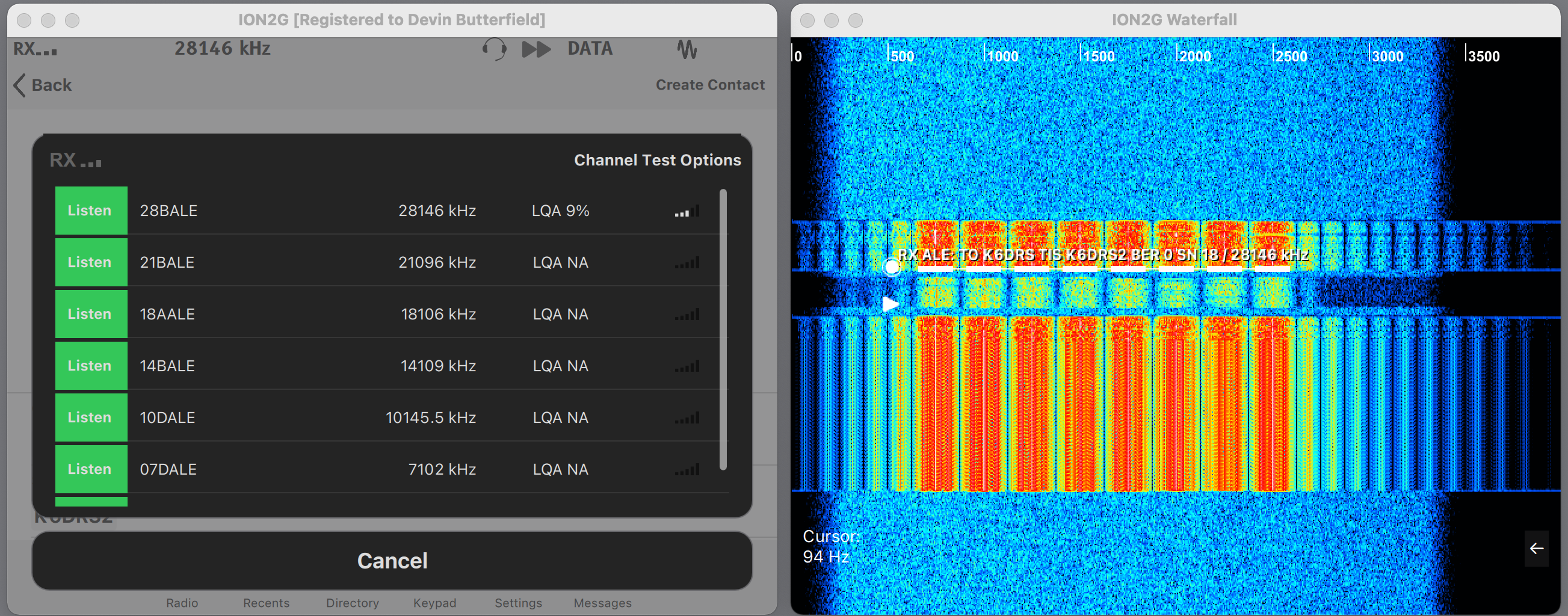
Next click "Channel Test Options" in the top right.

Then click on the "Listen" button for the channel you want to test. This will tune the radio to that channel and allow you to listen before starting the call.

Then click "Test" to start the channel test call.

ION2G will now begin calling the station on this frequency and exchange link quality data.

When the test completes the Link quality result will be displayed. Note that this link quality result is not a raw value, but rather a weighted average over a number of days, and accounts for historical results as well. You can perform the same test on each channel in the list and then pick the channel with the highest LQA value. To place the call on the best channel just click on the channel name.
- When scan paused to receive a sounding, resume scan after receiving a sounding address several times. This reduces time spent stopped on network soundings and helps improve overall network efficiency.
[X]Support for GPS devices and automatic 1-minute location resolution reports in ALE response and ACK messages.
4.2 Bug Fixes
- Fixed issue with tune tone being full-power when it should be 10dB down.
- Fixed several issues with radio / operator audio controls and muting
- Fixed issue with unsaved network changes dialog background/forground display for dark mode
- When you attempt to call a station on a network that you don't have a self address for, software whould prompt the user to add a self address rather than simply not showing any options.
- Same issue when creating a contact for a network you don't have a self address on
- Must force mode back to data on unlink because the radio may have changed (by user or other software)
- Fix issue that causes new channel definition to have the Enable Scanning box grayed out
- Fix: not displaying error for user when PTT fails
- Check that MUTE button is correctly highlighted after assets re-aquired
- after assets re-aquired, restore radio volume
- also restore radio volume on startup
5 0.9.7.6
5.1 What's New
[X]added raw ALE decode words to log file to aid with protocol analysis[X]Scroll bars on channel and network select dialogs are now visible all the time (to make it more clear that more items are available to choose)
5.2 Bug Fixes
[X]fixed IC-7200 data mode command[X]fixed problem that caused "overwrite" loading of code plug self addresses to fail[X]corrected font size for waterfall annotations on macos[X]fixed bug that broke assets release feature (bug as introduced with new radio driver framework in version 0.9.7.5)
6 0.9.7.5
6.1 What's New
[X]New radio driver framework which will allow people to write their own drivers as loadable plugins in C++ or Python. If you are interested in supporting this please join the ion@groups.io list and raise your hand![X]When doing LBT for sounding, if a call is detected, use a random backoff timer rather than fixed to reduce network collisions[X]New build for macOS
6.2 Bug Fixes
[X]call activity icon is white on outbound call drawer (window) and size is different[X]hangup inbound selcall from inbound call view didn't actually hangup sometimes[X]fixed an issue that prevented setting custom CIV addresses for some radios[X]reverted the Flex6000 behavior of entering split mode to avoid relay switching, since this doesn't work well and causes new slices to be created.[X]fix issue with duplicate sounding reports (due to multiplen TWAS addresses being buffered due to fades, then last word wait they are processed as a group). Duplicates removed.[X]fix text on propagation view – wrong on dark mode[X]scan state in gui widgets not following CLI cmds[X]fix windows audio bug that was introduced in .4 with buffering change
7 0.9.7.4
7.1 What's New
[X]New CAT driver for TS-570S[X]New CAT driver for IC-7000 (not tested)[X]New CAT driver for IC-7100[X]New CAT driver for IC-7200[X]New code plug load options Merge and Overwrite. Merge will merge new items with your current configuration (where possible), while Overwrite will erase and always overwrite with the new configuration.[X]New feature to periodically attempt to connect to ion2g.app and check if new versions are available. If so raise dialog with link to invite user to go get it.[X]TX indicator and level bars turn read on transmit for better operator awareness[X]GPS Location and Grid square are now stored/retrieved from codeplug[X]Added lat / lon to shares heartbeat and online message reporta etc.
7.2 Bug Fixes
[X]Fixed serial port issue on Windows that caused laggy scanning[X]Update "REGISTER" button to actually take the operator to the website, and specificall to a registration page.[X]Fix issue with remote load of codeplug[X]Improve buffering on windows operator audio playback- some hardware exhibited stutter due to insufficient buffering
[X]Fix issue where generic radio driver view was not saving custom CIV address[X]Traffic channels are not intended to be scanned, so disable scan option when a channel is marked for traffic. NOTE: Call channels can always be used for traffic (default behavior) and do not need to be specially marked for it.
8 v0.9.7.3
8.1 New Features
[X]New alpha support for Yaesu FT-897 radios[X]renamed spectrogram to waterfall (more familiar terminology)[X]Added "None" option for operator audio input (since some stations have no input mic on their computer nor need it)
8.2 Bug Fixes
[X]Fixed issue with parity always defaulting to EVEN and not saving correctly.[X][14:21:27.995] ERROR: int RadioController::getCivValue(const string&):332 Invalid radio strting passed: Icom IC7300@[X]Fix audio issues on Raspberry pi that occured using the portaudio library – switched to pulseaudio ( the default now for most linux distros )
9 v0.9.7.2
9.1 New Features
[X]Implement operator microphone audio[X]new operator audio quick controls view- Ctrl-A to open it
- Allows quick swiching beteen operator audio and radio audio
- Mute control
- Volume control
- PTT button (when using operator audio)
9.2 Bug Fixes
[X]fix issue with overflow on rawdatamsg mailbox when switching audio[X]fixed issue with shares report url and key text fields not accepting manually input characters like ://,etc. This fix also allows copy/paste to work now.[X]fix the reporting bug when url is not valid; settings page now raises an error dialog when the string does not start with a valid http or https string[X]implement the fetch of the ham codeplug from the website via button trigger
10 v0.9.7.1
10.1 Bug Fixes
[X]Fixed issue with loading codeplug for some station settings, but not others would reset all station settings. The issue is that the flags for what groups are set needed to be more fine grained (not just "station", but audio, radio, etc.).[X]Going from directory to click message and message window already open gives the appearance that nothing happened. This is confusing. Fixed by raising conversation view and bringing up network / channel select within that view.
11 v0.9.7
11.1 What's New
[X]License restrictions removed – for hams only[X]Make "STOP" button abort AND stop scanning[X]Make sounding abort button abort AND stop scanning[X]CW ID will work anytime you are parked, or linked. It will send the callsign set in operator settings if SELCALL, or if not, it will use the self address of the network you are parked in.[X]Capabilities handshake (per 188-141B) now supported[X]Traffic channel negotiation (per 188-141B and 178-721D) now supported[X]Increased AQC DTM message length limit to 2k bytes in Messages view[X]Now code plugs can be saved as station-specific, system-specific, and directory in speparate files.
11.2 Bug Fixes
[X]If operator audio is disabled, ensure that channel audio is also disabled[X]Link indicators are redundant on inbound and call views[X]On windows, the ale link timeout didn't get set correctly- init of vars timing was different
- and many small issues
12 Known Issues
[ ]Not currently possible to use AQC DTM after traffic channel handoff or after ALE linkup[ ]You must hangup an existing call before attempting to send a message to a different station in the messaging view (later the new message will queue until you hangup)[ ]ion2g doesn't check that no other instances are running when it starts